Native Form Handling in React 19
.png)
But for years, developers have leaned on React Hook Form (RHF) for handling complex forms efficiently, and minimizing re-renders.
So, does React 19 finally provide a built-in alternative to RHF? Should you start using React’s new form features exclusively, or are there still scenarios where RHF is the better choice? In this article, we’ll break down the new form-related features in React 19, compare them with React Hook Form, and explore when to use each approach.
Native Form Handling in React 19
React 19 introduces several new hooks and features to improve form handling:
%2520(1400%2520x%2520400%2520px).png)
1.useActionState Hook
This hook manages form submission state and integrates with server-side actions seamlessly. It eliminates the need for manually handling loading and error states in form submissions, making it a great fit for server-rendered applications.
Pros:
- Simplifies server-side form handling.
- Reduces boilerplate code for tracking form submission states.
- Works well with React Server Components and frameworks like Next.js.
Cons:
- Primarily focused on server-side validation.
- Requires a more declarative mindset for handling form submissions.
2.useFormStatus Hook
useFormStatus provides real-time feedback on the submission state of a form. This hook allows components to check if a form is currently being submitted, making it easy to display loading states or disable submit buttons.
Pros:
- Lightweight and easy to use.
- Reduces unnecessary re-renders compared to traditional state tracking.
- Works well with progressive enhancement strategies.
Cons:
- Doesn’t provide client-side validation.
- Primarily useful for UI feedback rather than full form management.
3.useOptimistic Hook
This hook enables optimistic UI updates, allowing the interface to reflect changes before receiving a response from the server. This is particularly useful for improving perceived performance in form-heavy applications.
Pros:
- Enhances user experience by reducing perceived latency.
- Works well with server actions and updates.
Cons:
- Doesn’t replace traditional client-side validation needs.
- Requires careful implementation to prevent UI inconsistencies.
React Hook Form: A Battle-Tested Form Library
React Hook Form (RHF) has been the go-to solution for form handling in React applications due to its performance optimizations and minimal re-renders. Unlike React 19’s new form features, RHF is designed for client-side validation and complex form logic.
Why Developers Love React Hook Form
- Minimal Re-renders
Uses uncontrolled components to optimize performance. - Built-in Validation
Supports schema-based validation using Zod, Yup, and other libraries. - Great for Complex Forms
Works well with dynamic forms, multi-step forms, and nested field structures. - Integrates with UI Libraries
Seamless integration with Material UI, Ant Design, and other component libraries.
Comparing React 19’s Native Forms vs. React Hook Form
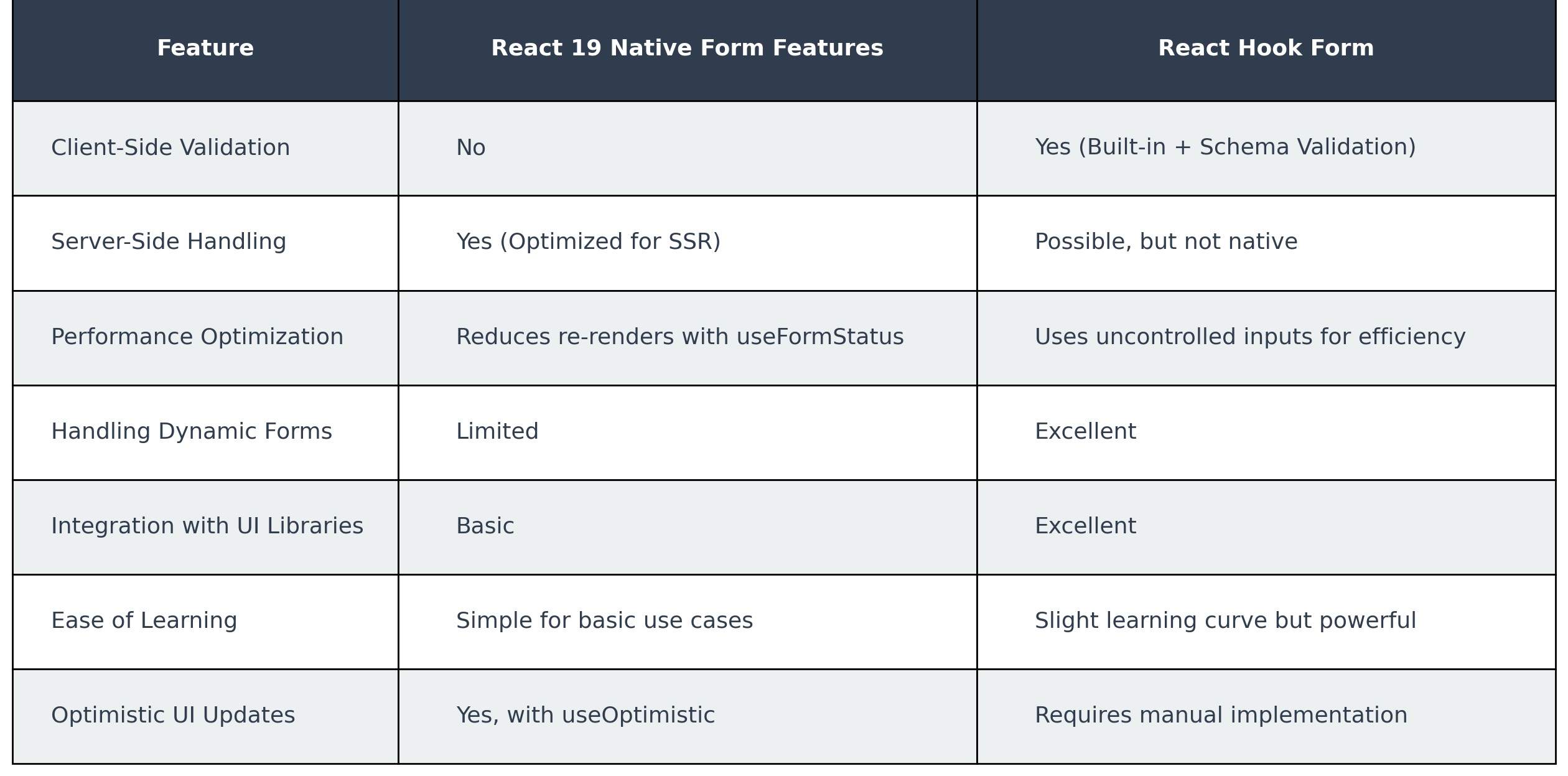
When to Use React 19’s Native Form Features
React 19’s built-in form features are great for:
- Simple forms where server-side validation is preferred.
- Server Components & Next.js applications that rely on actions rather than traditional event handlers.
- Forms that don’t require complex validation beyond basic HTML constraints.
- When reducing dependencies is a priority, keeping the app leaner.
When to Use React Hook Form
RHF remains the best choice when:
- You need immediate client-side validation without waiting for a server response.
- The form involves complex validation logic (e.g., field dependencies, regex validation, conditional validation).
- You are working with dynamic or multi-step forms.
- You want fine-grained control over form behavior and UI.
- Performance is a top concern, and you need to minimize re-renders.
Can You Combine Both Approaches?
Yes! In many cases, you can use React 19’s form features alongside RHF:
- Use RHF for client-side validation and controlled form behavior.
- Use
useActionStatefor handling server-side submission logic while keeping UI updates smooth with RHF’s event handling. - **Combine RHF with **
useFormStatusfor better submission state management.
Example: Using RHF with useActionState for a hybrid approach:
React 19 introduces useful built-in form features that simplify server-side form handling, but they don’t entirely replace React Hook Form—especially for complex, client-side-heavy applications. If you’re working with simple forms, reducing dependencies, or focusing on SSR applications, React 19’s native form features might be enough. However, for larger-scale applications requiring dynamic forms, fine-grained validation, and high performance, React Hook Form remains an excellent choice.
Ultimately, choosing between React 19’s native form handling and React Hook Form depends on your project’s specific needs. And in many cases, the best solution might be a combination of both.